Alight Motion System Requirements

Alight Motion System Requirements

Alight Motion System Requirements – Complete Guide for Different Operating Systems 2026

As we all know, Alight Motion is a premium video editing application. This app is popular on small screens such as Android devices, Tablets, iPhones, and iPads. Most of the users create content for their YouTube channels and Social Media platforms. They avoid a high-end video editing setup and prefer Android and iOS editing apps to edit their videos professionally.

But before we install this application on our devices. Let’s look at the requirements to run Alight Motion smoothly on smartphones. In this complete guide, we will cover all the devices and their minimum and recommended system requirements. So, without wasting any moment, let’s dive into it.
Alight Motion System Requirements

Alight Motion System Requirements for Android
Alight Motion System Requirements for Android & iOS
Alight Motion System Requirements
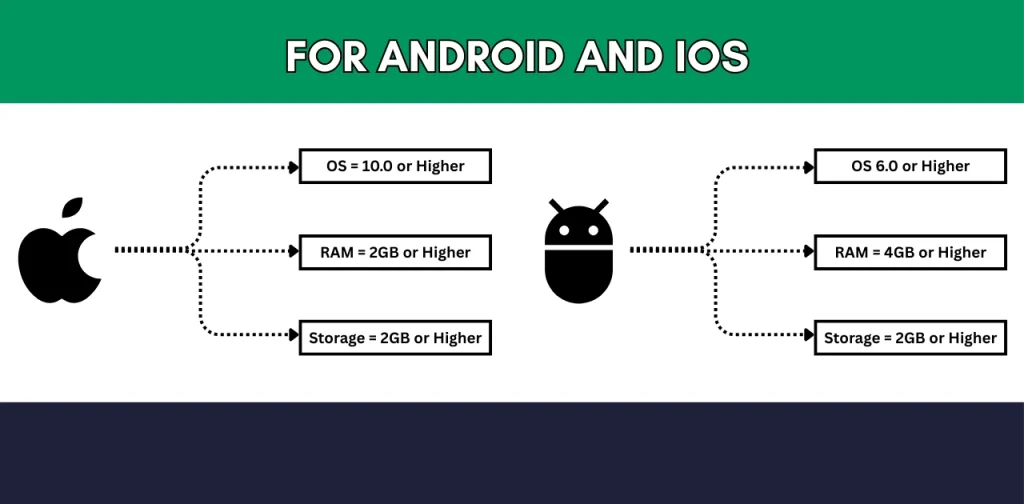
  • Your Android phone must have a minimum of Android 6.0 ( for a better performance, Android 7.0 or higher is recommended )
  • The minimum RAM of your device must be 2 GB ( 4 GB or higher is recommended for fast rendering, better performance and quick exporting )
  • To install the application, your device must have a minimum of 2 GB free storage ( You need higher device storage if you are working on professional projects )
  • If you love the stabilisation effects and want to use them in your videos. Make sure your device has a gyroscope sensor for better editing.
  • Your device processor must be Octa-Core ( Higher is recommended for lag-free and quick rendering )

These are the minimum and recommended requirements for an Android device. If you meet these requirements, you can install Alight Motion without any issues and use it smoothly.

Alight Motion System Requirements for iOS

  • Alight Motion works on all iOS devices, such as iPhones, iPads, and iPod Touch
  • Your iPhone must have iOS 10 or later.0 or later version
  • An iOS device must have at least 2 GB of RAM for better performance.
  • Make sure your device has at least 2 GB of free storage to download and install the application.
  • Alight Motion will work best on a high-end iOS device, such as an iPhone 7 or later.

Read about the masking in alight motion!

Alight Motion for Other Operating Systems
Alight Motion System Requirements for other OS
Alight Motion System Requirements

Alight Motion was initially developed for Android and iOS devices. There is no such direct method for using it on other OSs like Windows, Mac, and Linux. But there are some methods (using third-party applications) to use Alight Motion.

For Windows

  • No direct .exe or web-based application is available for Windows to use Alight Motion.
  • To use Alight Motion on PC, you need an Android emulator on your Windows, such as BlueStacks, Nox Player or LD Player.
  • For installing the emulator and using the application, your system must have the following requirements:
  • Windows 8 or Higher ( Windows 7 can create a lot of issues, as it is outdated now )
  • Your system must have at least 4 GB of RAM.
  • Your system must have an AMD or Intel processor with multi-core.

If your Windows meet all these requirements, then you can easily install the emulator and run Alight Motion smoothly.

For macOS

As with Windows, there is no direct application for MacOS to use Alight Motion. But there are third-party methods for using it on macOS. 

  • Same as Windows, you need to install the Android emulator on your Mac.
  • To install the Bluestacks, Nox and LD player, your system must meet the following requirements:
  • You need MacOS 10.11 or higher to install BlueStacks.
  • You need macOS 10.10 or later to install NoxPlayer.
  • You need MacOS 10.13 or higher to install the LD Player.

For Linux

  • Like other PC OSs, Alight Motion isn’t available for Linux OS.
  • The installation of Android Emulators depends on the Linux distribution.
  • You can install them on Ubuntu and Debian.
  • Also, the performance and compatibility depend on “what kind of Linux are you using?”

For Chrome OS

  • Before installing Alight Motion, make sure your device supports the PlayStore.
  • If your device has the Play Store, you can install it directly from here.
  • Unfortunately, you will have limited options for Alight Motion on Chrome OS.
  • Alight Motion’s performance depends on your Chromebook’s specifications.

Alight Motion for other Mobile OS

  • Alight Motion is available in both official and unofficial versions for Ubuntu Touch and Sailfish OS.
  • The Alight Motion is only designed for Android and iOS.
  • Maybe in the future, it will be available on other OS.

Final Words

That’s all for the Alight Motion system requirements. This clears all your queries about the system requirements for Alight Motion on other OSs. The app was only developed for Android and iOS devices. But if you are willing to install it on other devices, make sure to read this complete guide.

FAQs

Yes, if you are using Ubuntu OR Debian Linux Os.

The minimum system requirement for Android is 1.5 GB of storage.

You need macOS 10.10 to install NoxPlayer.

Similar Posts